Pages

Showing posts with label tricks. Show all posts

Wednesday, February 16, 2011

Tricks to Make Money on Paisalive.com Instantly

Paisalive.com offer free online money making without investment.For just signup they give 99 rupee and they pay 50 rupee for first two referels after that they pay only two rupees for each referels.You can make upto 200 instantly.After that really its very difficult to make money.because they send only 5-6 emails per day for each email they pay only 0.25 rupee its very little money. The minimum payout is 500 rupee.By reading email really hard to make 500.Its only possible by refering others.But refering is also very difficult because to make 300 rupee,you want to refer 150 people so this is also not possible.Many people are tried fake references with one pc,in one system we make upto 4 referel signup,more than 4 they detect it has fraud and may suspend all referels and may be your account also.Here i have an trick to make multiple referels in one system.Just you need to Download this software and instal it to your system.This software came up with inbuilt mozilla firefox open firefox browser at a time open 5 tabs and signup using your referel link.Then close browser and again open the browser repeat the step. system dont detect it was fraud.
Signup here

Saturday, February 12, 2011

How to Update your Nokia Mobile With New OS

Is your nokia mobile operating system is get crashed?or your phone was not working well?Or it was infected by virus?Dontwary here is the complete step by step procedure to solve your problem.Nokia company will release phone software updates every 6 months.By updating your phone it was worked well like new mobile.

Benefits of updating your phone software
* updating your phone software it worked as like new mobile.
* the softwares that installed in your mobile was replaced with current version.
* if the mobile is infected by virus it will be removed.
* The games and software will updated automatically.
* If any phone os files was deleted it will repaired.
 Requirements for mobile
1.Any nokia mobile
2.Relevent Data cable for mobile.
3.Battery with full charged.
requirements for pc
minimum 1gb ram pc
windows xp or windows 7 or vista.
Nokia pc suite software for relevent mobile download from here.
Nokia software updater download from here.
Procedure for updating your phone software

First Find out your device’s version number and begin updating

Step 1
Step 1
find your device software version by entering this code.
*#0000#

If you are able to select Options, you may use  Check for updates quickly and update using only your device. You need not perform the remaining steps.

Step 2
Otherwise, your display will show your current software version number (e.g. V 6.45.234). Please write this down – you’ll need it to complete the next step.
Step 3
Step 3
To find what the latest available device software is, you’ll need your device’s product code. The code is printed on the behyond your nokia battery(e.g. CODE: 0455966).


Step 4
Enter this product code here
Note: Before updating, you might like to backup your phone's contents using Nokia PC Suite. These can be restored once the update is complete
Step 11) Download and install Nokia Software Updater (this need only be done once).
and download nokia pc suite for your nokia mobile
and install it to pc.
Step 22) Connect your phone to your PC with a suitable USB cable and open Nokia Software Updater,with full charged battery.
Step 3
3) Follow the on-screen popup until your update is complete.


nokia pc suite Download

.

 nokia software updater Download


If you have any problem comment here

Sunday, January 30, 2011

Boot your windows xp very fast

Is your computer boot slowly?? Dont wary here is the popular tricks  
to Boot your windows xp very  fast.
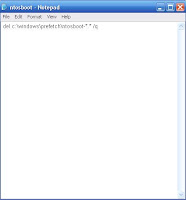
Step-1.Open notepad type "del c:\windows\prefetch\ntosboot-*.* /q”(No quotes) then save this text
            file as ntosboot.bat in C drive.


Step-2:then From start menu select Run and type "gpedit.msc"
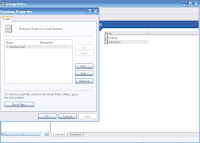
step-3.Double click “Windows Settings” below “Computer Configuration” and double click again on
         “Shutdown” in the right window
step-5.In the new window, click “add”, “Browse”, locate your “ntosboot.bat” file and click “Open”.
step-6.Click “OK” then “Apply” & “OK” once again to exit.
step-7.again From the Start menu, select “Run…” and  type “devmgmt.msc”.
step-8.Double click on IDE ATA/ATAPI controllers
step-9.Right click on “Primary IDE Channel” and select Properties.
step-10.click on the “Advanced Settings” tab then on the device or 1 that doesn’t have ‘device type’ greyed.
            out select ‘none’ instead of ‘autodetect’ and click “OK”.
step-11.then Right click on “Secondary IDE channel”, select “Properties” and repeat step 10.


step-12.Then restart your computer.
If any problems leave your comments